Phoenix Metro Network & Security Infrastructure • Phoenix Metro • 602-739-3026
Cox Homelife Transition • Phoenix Metro

Cox Homelife Service Ended? Keep Your Compatible Alarm System.

If you received notice that Cox Homelife is being discontinued October 22, 2026, Alarm Butler can evaluate your current system and help you transition to a modern professionally monitored security system.

Cox Transition SpecialQualifying customers
Alarm.comMobile app & monitoring options
ROC #320454Licensed Arizona field installation
Touchscreen security panel replacement for Cox Homelife customers in Phoenix
COX HOMELIFE TAKEOVER SPECIAL

Get Your Home Protected Again.

Keep your compatible existing alarm system. Choose the monitoring plan that works best for you.

FLEXIBLE · NO LONG-TERM AGREEMENT
↗

Option 2: Month-to-Month

Own the communicator and keep the flexibility of monthly monitoring.

$600upfront
$40/monthTaxes included
  • Compatible communicator included in upfront fee
  • Standard installation included in upfront fee
  • 24/7 professional alarm monitoring
  • Cellular alarm communication
  • Alarm.com app for remote arming
No long-term monitoring agreement
Ask About Month-to-MonthOr request a system review

Both options include the same standard $40/month alarm monitoring. Choose $0 upfront with a 36-month agreement, or pay $600 upfront for month-to-month flexibility.

Will your current system qualify? We verify the panel, keypads, sensors and wiring before confirming eligibility. Incompatible wireless sensors, Cox-branded proprietary touchscreens, repairs, additional equipment and nonstandard work may cost extra. Your system is not professionally monitored through us until installation, testing and monitoring activation are confirmed.
Not sure which alarm you have? Send photos of your keypad and the outside of your metal alarm cabinet. See compatible-style equipment photos ↓
What Happens Next?

A practical Cox Homelife replacement plan

1. Document the existing system

We review the Cox panel, sensors, cameras and any smart-home devices currently in use.

2. Verify compatibility

We do not promise that every Cox device will work with a replacement panel. Each component is checked first.

3. Replace and test

The new alarm is programmed, tested and connected to the selected monitoring service before the transition is complete.

Phoenix Metro

Cox Homelife replacement throughout the Valley

Alarm Butler serves Phoenix, Scottsdale, Tempe, Mesa, Chandler, Gilbert, Glendale, Peoria, Surprise, Goodyear, Avondale, Queen Creek, Buckeye, and San Tan Valley. If you are searching for a Cox Homelife alternative, security panel replacement, alarm takeover or monitored home security in the Phoenix area, start with an equipment review.

Independent replacement service

Trinity Systems and The Alarm Butler are independent businesses and are not affiliated with, endorsed by, or sponsored by Cox Communications. Cox and Homelife are trademarks of their respective owners.

For the most current information about your Cox account or discontinuation notice, review the information provided directly by Cox.

Cox Alarm Upgrade Eligibility

Is a free Cox alarm upgrade available after Homelife ended?

Yes. Qualifying existing Cox alarm systems can receive a compatible communicator upgrade and standard installation for $0 upfront with a 36-month monitoring agreement at $40 per month including taxes. The plan includes cellular alarm monitoring and Alarm.com app access on compatible equipment. This offer does not include every full panel replacement, incompatible sensor, camera or repair. Send photos of your keypad and alarm panel label so we can confirm eligibility and provide the included scope in writing. The Alarm Butler is an independent provider and is not affiliated with Cox.

Ask about your alarm system · Call 602-739-3026

MORE THAN ALARM MONITORING

What Happens to Your Cox Cameras, Thermostat, Doorbell & Smart Locks?

Some devices can be reconnected; others require compatible replacements. We check the exact model before recommending equipment.

🌡️

Smart Thermostats

Selected Z-Wave thermostats may pair with compatible Alarm.com equipment after a reset. Cox-specific models may need a new solution.

Thermostat questions →
🔒

Smart Door Locks

Some Z-Wave locks can be re-enrolled for supported remote control. We'll check model compatibility and required service features.

Door lock questions →
📷

Security Cameras

Old Cox cameras often cannot be transferred. Trinity Systems can quote UniFi Protect cameras with local recording and no required monthly video subscription.

Request a camera quote →
🔔

Video Doorbells

We can evaluate your current doorbell, wiring and chime and recommend a compatible replacement when necessary.

Doorbell questions →
Already switching your alarm?Ask us to review your Cox cameras and smart devices during the same consultation.Call 602-739-3026
See Your Equipment

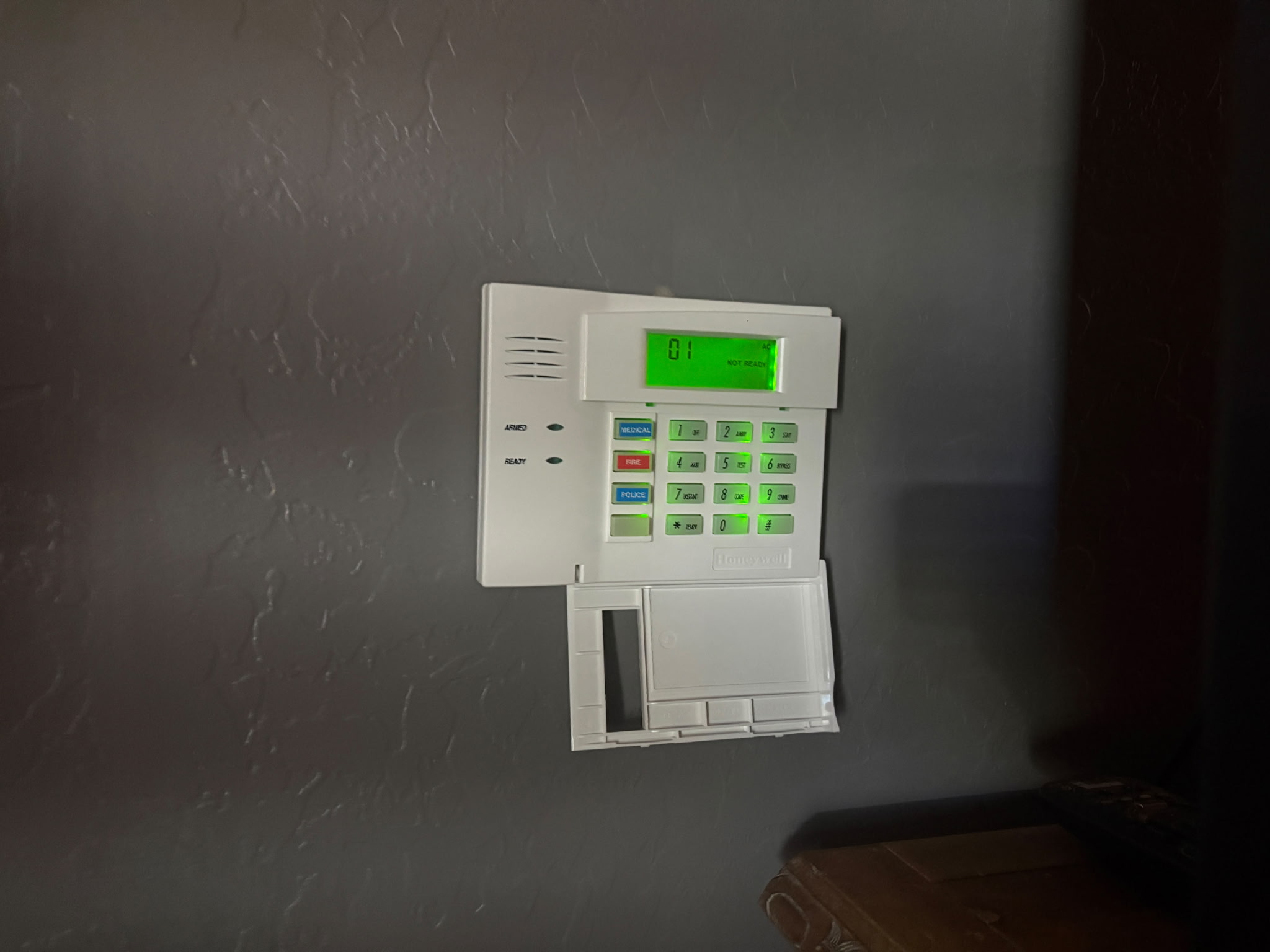
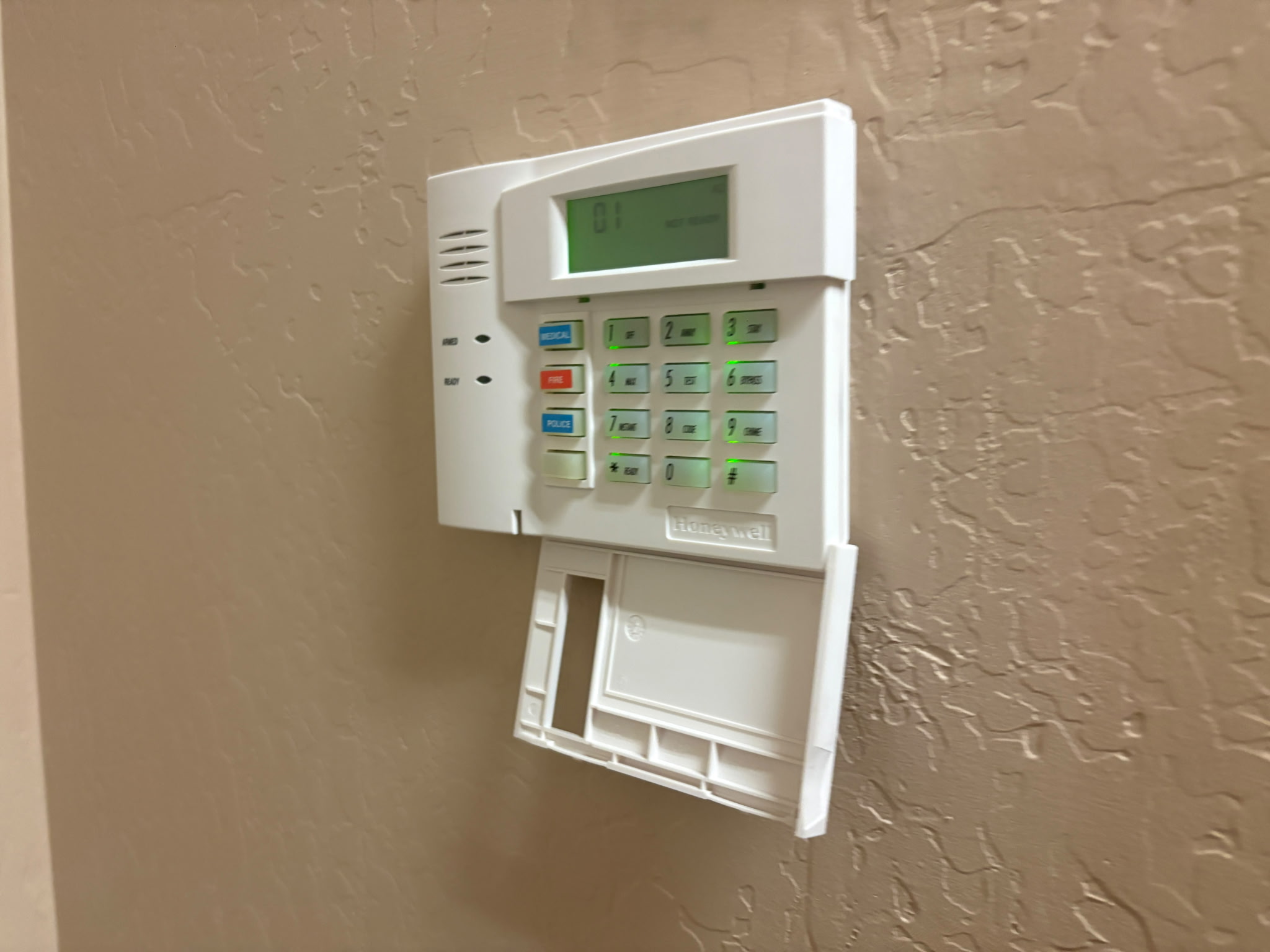
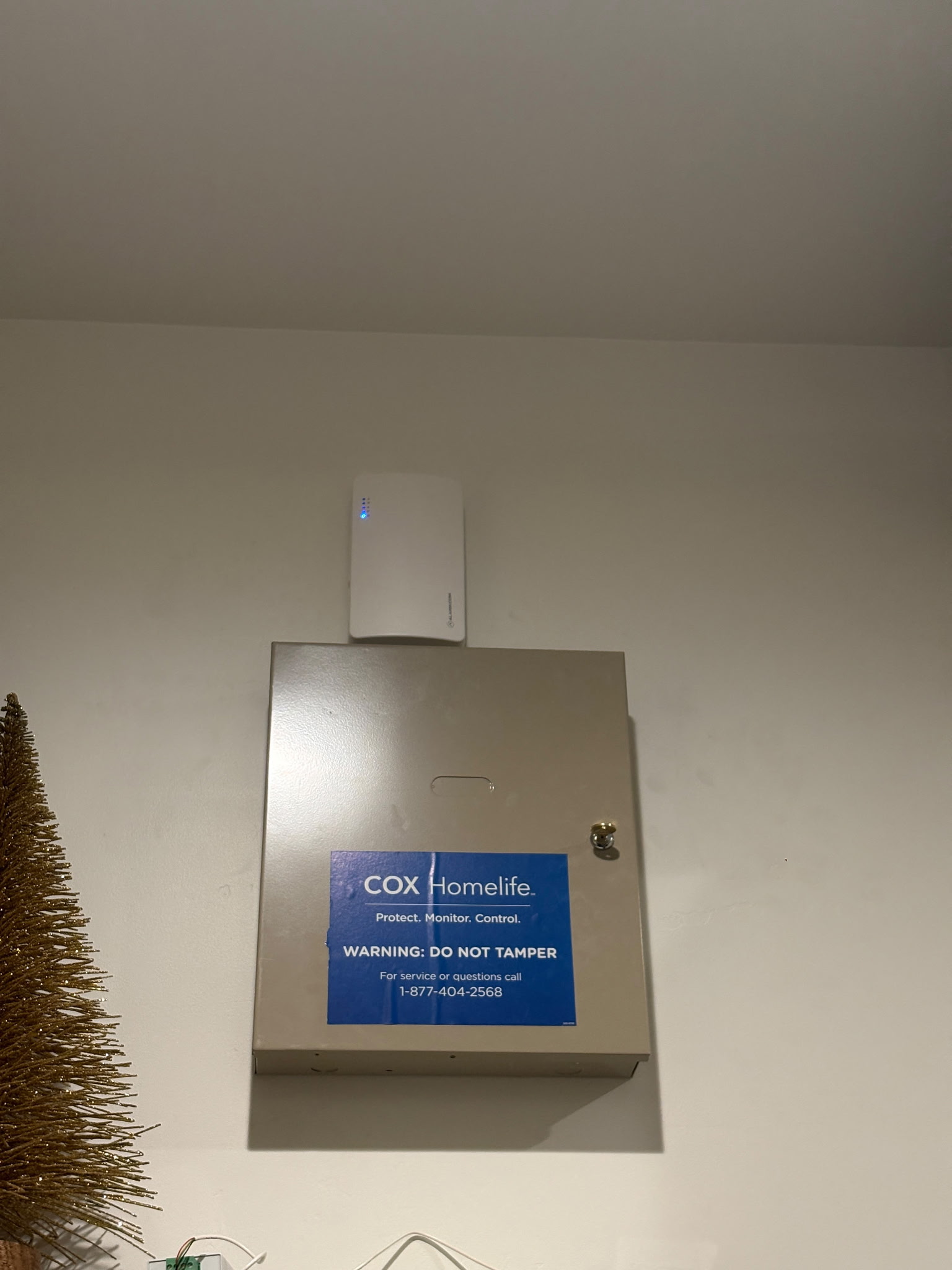
Does your Cox Homelife alarm look like this?

These are real examples of Cox Homelife equipment and Honeywell keypads. Similar-looking equipment may be eligible for a takeover, but appearance alone does not confirm compatibility.

Cox Homelife metal alarm control cabinet mounted on a wall
Cox Homelife alarm cabinet. The control panel model inside must be verified.
Honeywell hardwired alarm keypad with green display on dark wall
Honeywell keypad example. Similar keypads may indicate a Vista-style system.
Honeywell Vista-style alarm keypad on beige wall
Another Honeywell keypad example; verify panel and sensors before takeover.

Send us two photos: your keypad and the outside of the alarm cabinet. We can start reviewing your system without an unnecessary first trip. Please do not open the cabinet or handle wiring yourself.

Communicator availability: Compatible communicators are currently experiencing distributor backorders. We secured an allocation of 30 and are sourcing additional units to help homeowners restore monitoring. We take this seriously and will confirm stock and scheduling before promising an activation date.

Call or text 602-739-3026 or request a system review.

ONE APP FOR COMPATIBLE DEVICES

Alarm.com Can Do More Than Alarm Monitoring

Ask about bringing compatible security, cameras, doorbells, door locks, lighting and thermostats into the Alarm.com app. Optional equipment and service features may be required.

🛡️ Security

Arm, disarm and receive supported alarm notifications.

📹 Cameras & doorbells

View compatible Alarm.com video equipment with the appropriate video plan.

🔒 Smart locks

Control supported locks with the required automation features.

💡 Lights & thermostats

Manage compatible devices and supported automations.

UniFi Protect is also available as a separate local-recording camera option, normally using its own app. Existing Cox devices must be checked individually.

Business owner? Explore commercial alarm, video and access control →
COX HOMELIFE + ALARM.COM ANSWERS

Frequently Asked Questions About Alarm Takeovers and Smart-Home Devices

Answers for Phoenix-area homeowners researching Cox Homelife replacements, Alarm.com, Honeywell, cameras, doorbells, locks and thermostats.

Can Alarm.com take over my existing Cox Homelife system?

Alarm.com is a platform used by participating alarm service providers. The Alarm Butler can evaluate whether your existing Honeywell Vista or other supported panel can use a compatible Alarm.com communicator. Cox-branded proprietary equipment may not transfer.

Can I keep my Honeywell Vista 20P alarm panel?

Many Honeywell Vista 20P panels can be reused after a technician verifies the panel model, condition, keypad, sensors, wiring and supported communicator. We cannot confirm compatibility from the keypad alone.

Can I keep my existing wired door and window sensors?

Often, yes. Properly working compatible hardwired contacts can typically remain in place. We test every zone before activating monitoring.

Will Cox Homelife wireless door sensors and motion detectors still work?

Some Cox-provided wireless devices are proprietary or use incompatible frequencies and may require replacement. We verify the existing wireless receiver and each sensor before quoting any additional equipment.

Will my Cox Homelife touchscreen work with Alarm.com?

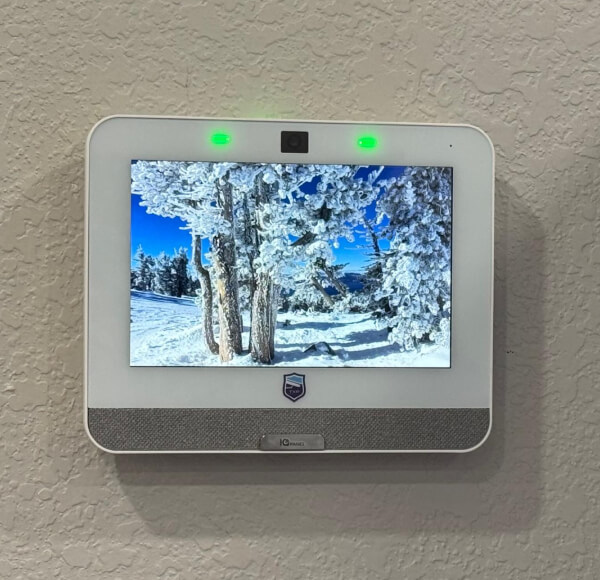
A Cox-branded touchscreen is often proprietary and cannot simply be moved to a new monitoring provider. A compatible hardwired Honeywell keypad may be reusable, or we can discuss replacement equipment.

Can I use the Alarm.com app to arm and disarm my existing alarm?

Yes, on eligible systems with a compatible installed and activated Alarm.com communicator and service plan. The app can provide remote arming and disarming and supported notifications.

How much does it cost to switch Cox Homelife monitoring in Phoenix?

For qualifying existing systems, The Alarm Butler offers a $0 upfront communicator and standard installation with a 36-month agreement at $40 per month including taxes. A month-to-month option is $600 upfront for the communicator and standard installation, then $40 per month. Repairs or incompatible equipment cost extra.

Can I change alarm monitoring companies without replacing my whole system?

Often, yes, if you own a supported panel and the existing wiring and sensors are compatible. We inspect the equipment and confirm any communicator or keypad changes required.

Is my old Cox alarm monitored after Cox Homelife ended?

Do not assume it is. A keypad that powers on does not prove a central monitoring station is receiving signals. Professional monitoring through The Alarm Butler begins only after installation, signal testing and activation are confirmed.

How quickly can you restore my Cox Homelife monitoring?

Timing depends on the panel inspection, communicator availability, any replacement sensors and appointment scheduling. We are securing communicator inventory amid backorders and will confirm an installation date before making commitments.

Can I send pictures of my Cox Homelife keypad to check compatibility?

Yes. Send a clear photo of your keypad and the outside of the metal alarm cabinet. We can provide an initial compatibility review, but may need to verify the control board and wiring on site.

Why are Honeywell alarm communicators backordered?

Some compatible cellular communicators are experiencing distributor backorders as customers seek replacement monitoring. The Alarm Butler has secured an allocation of 30 units and is seeking more. Inventory and appointment availability can change.

Can I keep my Cox Homelife thermostat with Alarm.com?

It depends on the exact thermostat model, radio technology and whether it can be reset or excluded from the previous network. Certain compatible Z-Wave thermostats can be paired with supported Alarm.com equipment. Some Cox-proprietary or Wi-Fi models may require a different app or replacement.

Does Alarm.com work with smart thermostats?

Alarm.com supports selected compatible thermostats when the required hub, panel and service features are enabled. We verify the model and discuss supported temperature control, schedules and automation before promising integration.

Can I reuse Cox Homelife smart door locks?

Some compatible Z-Wave locks can be reset and enrolled with a supported Alarm.com system. Compatibility, ownership codes, lock condition and available automation features must be checked. Proprietary locks may not transfer.

Can Alarm.com lock and unlock my front door?

With a supported smart lock, compatible controller and enabled service features, Alarm.com can offer remote lock control and automations. This is not included automatically with every $40 monitoring takeover and may require additional equipment or service.

Will my Cox Homelife cameras work in the Alarm.com app?

Do not assume so. Many Cox-provided cameras use proprietary provisioning and cannot be moved to a new Alarm.com account. We can review the camera models and offer supported replacement options.

Can I reuse my Cox Homelife video doorbell?

It depends on the doorbell model and whether it can be independently reset and supported by the replacement platform. Cox-branded devices may not be transferable. We can assess your wiring, existing chime and preferred replacement.

Can I replace Cox cameras and doorbells with UniFi Protect?

Yes. Trinity Systems installs compatible UniFi Protect cameras and doorbells with local recording and remote viewing. Some existing cabling may be reusable. Doorbell power and mechanical chime compatibility must be verified for the selected model.

Do UniFi cameras need a monthly subscription?

UniFi Protect can record locally without a required monthly cloud video subscription when installed with an appropriate UniFi Protect console or recorder. Hardware, storage, installation and any optional services are separate.

Can I have Alarm.com monitoring and UniFi cameras at the same home?

Yes. The alarm and camera systems can operate as separate platforms: Alarm.com for supported security monitoring and UniFi Protect for local video recording. This typically means using two apps rather than promising all devices in one app.

Will my Cox Homelife smoke or carbon monoxide detectors work?

Life-safety device compatibility must be individually verified. Existing smoke and CO detectors may need replacement to meet the requirements of the new panel, monitoring service and applicable codes. Never assume a detector is monitored based on its indicator lights.

Can I use my alarm without Cox Internet?

A compatible cellular alarm communicator can transmit alarm signals without Cox Internet. App access on your phone still requires data or internet, and connected cameras, thermostats and locks may have their own network requirements.

Can you add more door sensors, cameras or a keypad during takeover?

Yes, subject to equipment compatibility and a separate quote for additional devices and installation. We can also review coverage gaps and future upgrades while on site.

Does The Alarm Butler also install Wi-Fi, networking and electrical work?

Trinity Systems handles networking, Wi-Fi, cameras and low-voltage technology services. General electrical work should be performed by an appropriately licensed electrical contractor; we can coordinate when needed.

Do you offer month-to-month alarm monitoring after Cox Homelife?

Yes, for qualifying existing systems: $600 upfront for the compatible communicator and standard installation, then $40 per month including taxes for monitoring and supported Alarm.com app access, with no long-term monitoring agreement.

Can you take over DSC alarm systems too?

Certain DSC panels can be eligible for a communicator-based takeover, depending on the exact model, firmware and compatible accessories. Send panel and keypad photos for an initial review.

Can I transfer an existing Alarm.com account to The Alarm Butler?

An existing Alarm.com installation may require the previous dealer to release the account or cellular module. We can review the equipment and explain available options; transfer is not guaranteed without the necessary release and compatibility checks.

What happens if the power goes out?

Backup operation depends on the condition and capacity of the alarm panel battery, communicator and any connected networking equipment. We check relevant backup power during installation and recommend replacement if needed.

Can you replace Cox Homelife equipment in Scottsdale, Mesa, Gilbert or Peoria?

The Alarm Butler serves Phoenix and surrounding metro communities including Scottsdale, Mesa, Gilbert, Chandler, Glendale, Peoria, Surprise, Goodyear and Buckeye, subject to scheduling and service-area confirmation.
Equipment eligibility, pricing and service availability are confirmed after a compatibility review. Features vary by hardware and service plan.

Can Alarm.com control my security system, cameras, door locks, lights and thermostat in one app?

Yes. With compatible equipment and the appropriate Alarm.com service features, one app can manage alarm arming, supported Alarm.com cameras and video doorbells, Z-Wave door locks, lighting controls and thermostats. Device compatibility, a supported controller and optional service charges must be reviewed. The basic $40 monitoring takeover does not automatically include every smart-home or video feature.

Can I keep my Cox Homelife smart lights and use them with Alarm.com?

Some compatible Z-Wave light switches, dimmers and modules can be excluded from the old controller and paired with a supported Alarm.com system. Wi-Fi bulbs or proprietary Cox devices may require a different app or replacement. We check model numbers before quoting.

Can Alarm.com show my doorbell and security cameras alongside my alarm?

Supported Alarm.com video doorbells and cameras can be available in the same Alarm.com app as the alarm when video service and compatible equipment are enabled. Existing Cox cameras or doorbells may not transfer. UniFi Protect cameras are normally viewed through the separate UniFi Protect app.

Can Alarm.com connect my business alarm, access control and cameras in one platform?

For qualifying commercial installations, Alarm.com for Business can support integrated intrusion monitoring, compatible video surveillance and supported access control through its commercial platform, subject to compatible hardware, service packages and licensing. The Alarm Butler can evaluate the building and quote the required components and ongoing service.

Can you take over a Cox Homelife alarm at a small business or office?

Yes, we can evaluate an existing business alarm panel for a takeover. We check the panel model, sensors, communication path, life-safety requirements and business monitoring needs before quoting. Residential takeover promotions do not automatically apply to commercial properties.

Can you replace business cameras and add keycard or phone-based door access?

Yes. Trinity Systems designs UniFi Protect camera systems and UniFi Access installations for eligible commercial doors. These are typically managed through UniFi applications, not the Alarm.com app. If a business specifically wants a compatible Alarm.com integrated video and access solution, ask us for a separate commercial proposal.

Can my employees have different alarm codes and door access permissions?

Many supported business alarm and access-control platforms offer individual user permissions, schedules and activity histories. The available controls depend on the selected system, license and hardware. We review the number of employees and doors before recommending a setup.

Can my business use Alarm.com and UniFi at the same time?

Yes. A business may use Alarm.com for a supported alarm and automation platform while UniFi handles networking, cameras or access control. These are separate ecosystems and may require separate apps; we explain that before installation.

Call NowGet Quote